Stop keying in vendor bills.
Admin Workflows replaces manual bill entry. The system reads every utility bill and vendor invoice, however messy, matches it to the right property, unit, and GL account, and flags only what needs a human look. Your team approves, and the batch is ready for Rent Manager, AppFolio, Yardi, or Buildium.
No software switch. No migration. Your system stays the system of record.
Built for property managers and HOA teams where utility bills, vendor invoices, approvals, and month-end prep have outgrown one inbox and a spreadsheet.

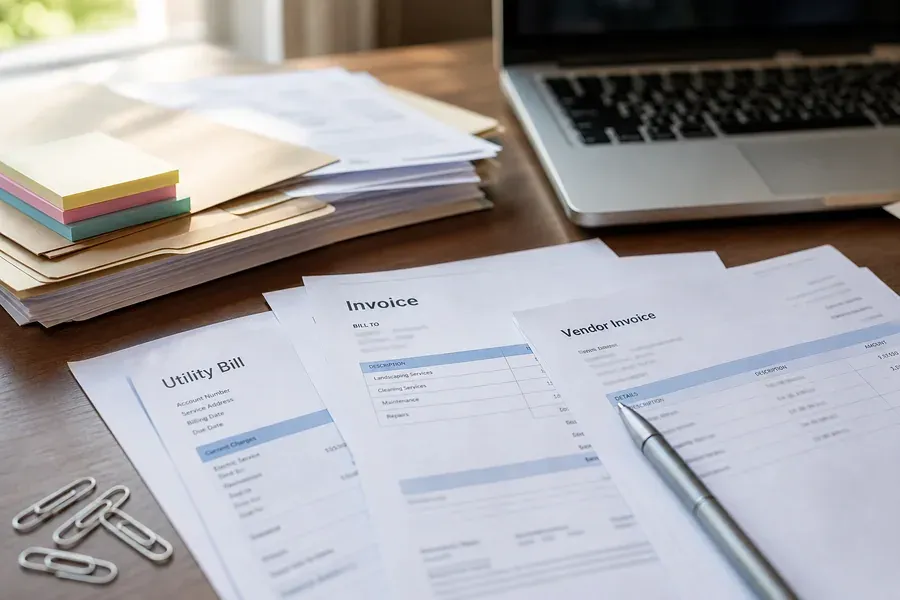

Your property management software isn’t the problem. The messy work around it is.
The software is fine. But somebody still spends Tuesday downloading water bills, asking three people to approve an invoice, and checking whether a bill already came in last month. It is slow — and it is where the mistakes come from.
The duplicate that gets paid twice. The bill nobody noticed was missing until the late notice. The invoice coded to the wrong property, found at year end. Almost none of it happens inside your software — it happens before anything is ever entered. A full-time salary usually already covers this work. The errors are what you pay on top of it.
How the system checks every bill
Our system reads utility bills and vendor invoices automatically, however messy they arrive: multi-page utility statements, multi-meter water bills, scanned or crooked PDFs, email attachments, portal downloads. Nobody has to look up account numbers or tie out balances by hand.
No payment is ever approved by the system. Your team approves and posts every bill.
One dashboard for the whole cycle
Your team works from one dashboard that shows what came in, what matched, what needs a look, and what’s ready for Rent Manager, AppFolio, Yardi, or Buildium. No software switch and no migration: your system stays the system of record, and your people stay in the approval seat.
- What arrived this cycle, by property and account
- What the system matched, and to which GL account
- What needs a look, sorted by confidence score
- What’s missing: expected bills that never arrived
- What’s approved and ready to export
See the work, not just a description of it
Walk through a full cycle: how bills arrive, how each one gets checked and coded, and what leaves as one clean batch.
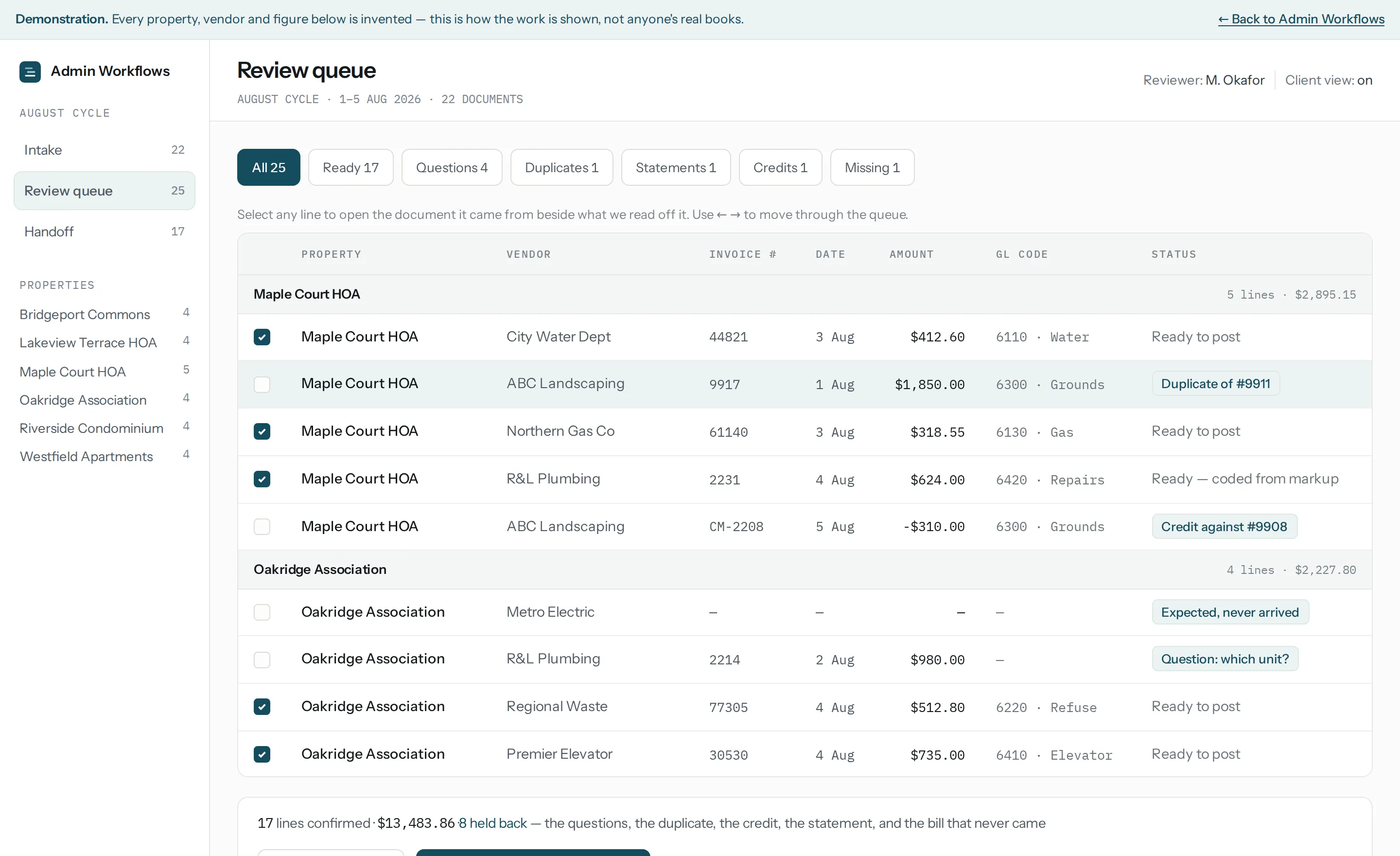
A working demonstration with invented data — no real property, vendor or figure appears in it.
What we handle
Start with utility bills and vendor invoices. Add the rest as it makes sense.
Accounts payable automation for Rent Manager, AppFolio, Yardi, and Buildium
AP automation is only useful if it fits the system you already run. Where your plan and permissions support it, we can explore a direct connection once the workflow is proven. Most setups start with import-ready files matched to how your team already enters bills — either way your software stays the system of record, and nothing about your setup has to change before we start.
We are an independent service and are not affiliated with, endorsed by, or a certified partner of any of these vendors. What we connect to depends on your system, your plan, and your permissions — we confirm that during the workflow review.
Built for the paperwork you actually get
Water statements with three meters on one page, a vendor invoice scanned crooked, a portal PDF with no property number on it. The system is built to read exactly this kind of document, and to hold back anything it is not sure about.



How it works
People make the judgment calls. Software does the repetitive parts. We start by watching how your team actually works today.
- Free 30-minute workflow reviewOn Zoom or in person. We talk through how bills arrive, who touches them, and where they stall. No documents needed.
- Set up with youIf there is a fit, our founder works with your team directly on setup: your property list, chart of accounts, and vendors, so the system knows where every bill belongs, plus your dedicated bill inbox or shared folder.
- Bills are read, matched, and scoredYou forward bills to your inbox or folder. Each one is read automatically, matched to its property and GL account, checked for duplicates and gaps, and given a confidence score.
- Your team approves, then postsYour team checks only the flagged bills on the review screen, approves the batch, and imports it into the software you already use.
What the system does, and what your team decides
The system does the repetitive reading and matching. Your team makes every call that costs money if it is wrong.
- Reads bills and invoices, including scans and awkward PDFs
- Pulls account numbers, service periods, amounts, balances, and invoice numbers
- Matches each bill to the right property, unit, and account
- Suggests coding from your own chart of accounts and past history
- Flags duplicates, near-identical amounts, and bills that never arrived
- Gives every bill a confidence score and holds back anything below the threshold
- Reviews the low-confidence bills on a simple review screen
- Corrects or confirms highlighted fields in a few clicks
- Sets what counts as an exception, and where the confidence threshold sits
- Approves and posts every payment
No payment is ever approved by the system. When the system is not confident about a bill, it goes to the review screen with the uncertain fields highlighted rather than being guessed.
How we keep this low-risk
We are a new company doing unglamorous work carefully. The system itself grew out of the one our founder built to run his own manufacturing business. Here is what that means in practice.
Common questions
Do we have to switch property management software?
No. Nothing migrates and nothing gets replaced. Rent Manager, AppFolio, Yardi, Buildium, or whatever you run stays your system of record. Admin Workflows replaces the manual typing and checking that happens before a bill is entered.
How do our bills get into the system?
You get a dedicated Admin Workflows inbox. Forward or email bills to it, or drop them into a shared Dropbox or Google Drive folder, and the system picks them up automatically. Most utilities can be set to email PDF bills straight to that address, so many bills arrive without anyone touching them. The system also keeps an expected-bill list for every property and account, and flags anything that has not arrived.
What exactly is a "packet"?
The approved batch for the cycle: each bill paired with its source PDF, the property, unit, and GL account it was matched to, and its approval status, plus a separate list of anything still open. Depending on your setup it arrives as an import-ready file matched to your software, a review packet, or both.
Can you integrate directly with our system?
Often, yes. Rent Manager, Buildium, and Propertyware publish APIs we can connect to, and we confirm what your particular plan and permissions allow during the review. Where a direct connection is not available — or simply not worth it for your volume — we deliver import-ready files matched to how your team already enters bills. Either way you are never blocked waiting on it: we can start without access to your systems.
Is this software or a service?
It is an automated system, set up and supported by us. The system reads each bill, matches it to the right property and GL account, and gives it a confidence score. Bills that clear the bar go to a ready-to-post list. Anything below it goes to your team on a simple review screen. You get the speed of automation without handing over control: your team approves every bill before it is posted.
What happens when the system isn’t sure about a bill?
It does not guess. Every bill gets a confidence score, and anything below the threshold goes to the review screen with the uncertain fields highlighted beside the original document. Your team confirms or corrects it in a few clicks. A smudged digit on a phone photo, a statement that covers two meters, or a bill with no property reference all get held back rather than posted.
Who checks the bills the system isn’t sure about?
Your own team, on the review screen. You also set the confidence threshold, so you decide how many bills go to review. During onboarding our founder works with your team directly to set up your accounts and mapping and to tune the threshold.
Is our data safe? These are financial documents.
Yes. Your data is encrypted, remote access runs over a VPN, every financial change is recorded in an audit log, and backups run automatically. We do not share your files or data with anyone, we delete your data on request, and we are happy to sign an NDA. The free review itself needs no documents at all.
Who approves and posts the bills?
Your team, always. The system reads, matches, scores, and flags. A person on your side reviews anything flagged, approves the batch, and posts it. The system never approves a payment.
What does the free 30-minute workflow review actually involve?
Thirty minutes on Zoom or in person about how utility bills and vendor invoices reach you today: who enters them, who approves them, and where they stall. No documents needed. Afterwards you get a short written map of how much of that entry the system could take over and, if there is a fit, what a focused pilot would look like. No cost, no obligation, and it is useful whether or not you work with us.
What do you need from us to start a pilot?
Nothing for the review. If you decide to run a pilot, we set it up with your property list and chart of accounts, a vendor list if you have one, and a few examples of how bills were coded before. Once a pilot starts, you forward your bills to a dedicated inbox or shared folder, and we run one cycle of them through the system. If that mapping does not exist in a usable form yet, building it becomes part of setup. That is normal, and it is better to know before we start than to discover it halfway through.
What does it cost after that?
If there is a fit, a founding pilot starts at $950: one billing cycle from a representative slice of your portfolio, one software workflow, and one account-mapping approach. Pilots with several intake sources, custom export formats, or more complex property and account mapping start at $1,500. Ongoing pricing is set after the pilot, when both sides know the real volume. The review itself is free and carries no obligation.
What kinds of bills can it read?
Multi-page utility statements, multi-meter water bills, scanned or crooked PDFs, phone photos of paper bills, email attachments, and PDFs downloaded from utility portals. Statements of account, credit memos, and one invoice covering several properties are recognized and handled separately rather than posted as normal bills.
How small or large a portfolio does this suit?
Best fit is small and mid-sized property management and HOA teams that already run accounting or property-management software, but still chase bills, approvals, and missing documents outside it. If utility bills and vendor invoices have outgrown one inbox and a spreadsheet, the work is worth doing. We are not built for enterprise portfolios yet, and we will say so on the review call rather than waste your time.
A founding pilot on your own bills
If the review shows a fit, we run one cycle of your real bills through the system end to end: automated reading, property and account matching, confidence scoring, the review screen, and export-ready files matched to the software you already use.
- Scope
- One billing cycle from a representative slice of your portfolio
- Workflow
- One software workflow and one account-mapping approach
- You get back
- A working dashboard and review screen, the account mapping we built, and export-ready files your team approves and posts
Pilots with several intake sources, custom export formats, or more complex property and account mapping start at $1,500.
What a pilot needs (not the review)
- Your property list and chart of accounts, or whatever stands in for them
- A vendor list, if you have one
- A few examples of how bills were coded before
- Once a pilot starts, you forward your bills to a dedicated inbox or shared folder
If that mapping does not exist yet in a usable form, building it is part of setup rather than something we assume you already have. It is the most common reason this kind of work stalls, so we would rather name it now.
Request a free 30-minute workflow review
Tell us how utility bills and vendor invoices move through your team today. In thirty minutes, on Zoom or in person, we’ll map how they move now, show how much of the manual entry the system could take over, and tell you plainly whether a pilot makes sense.
Thanks. We will follow up from sales@adminworkflows.com within one business day to set a time for your 30-minute review, on Zoom or in person. No documents needed.